
You don’t need a massive budget or a dedicated security team to start protecting your business. Some of the most effective security measures are also the simplest, and you can knock them out this week.
Here are five things that cost little to nothing, take minimal time, and immediately reduce your risk.
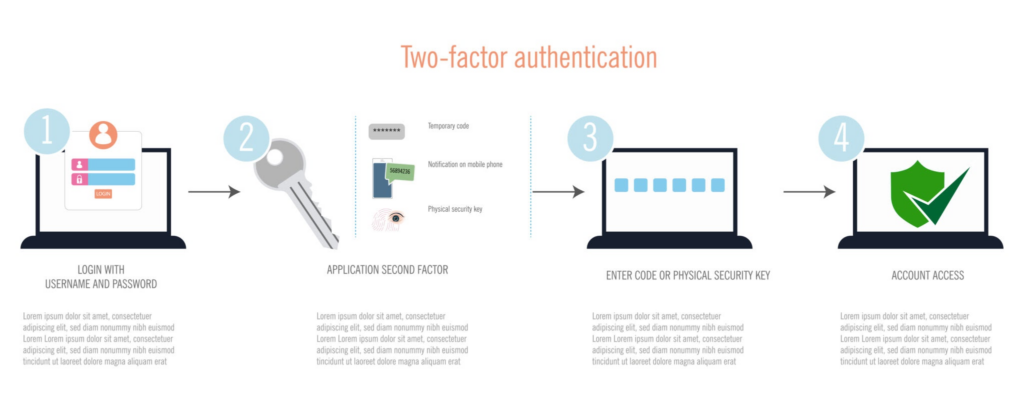
1. Turn On Multi-Factor Authentication (MFA) Everywhere
If your email, cloud storage, banking, or any business-critical platform supports MFA and you haven’t turned it on, that’s priority one. Passwords alone aren’t enough. They get reused, phished, and leaked in breaches all the time.
MFA adds a second layer. Even if someone gets your password, they still can’t get in without that second factor.
Where to start: Email accounts and anything financial. Then work outward to file storage, admin panels, and SaaS tools. Most platforms have MFA built in; it just needs to be enabled.
2. Review Who Has Access to What
Most small businesses don’t have a formal process for granting or revoking access. That means former employees might still have logins, and current employees might have access to systems they don’t need.
Take 30 minutes and audit your user accounts. Who has admin access? Does everyone still need the access they have? Are there accounts for people who left six months ago?
What to look for: Shared accounts, unused logins, and anyone with admin rights who doesn’t need them.
3. Make Sure Your Backups Actually Work
Having backups is great. Having backups that you’ve never tested restoring? That’s a false sense of security.
Run a test restore. Pick a file, a folder, or even a full system image and verify you can actually get your data back. You’d be surprised how often backup jobs silently fail, run out of space, or back up the wrong things.
Quick test: Restore a single file from your most recent backup. If you can’t, you have a problem worth fixing today.
4. Update Your Software and Firmware
Unpatched systems are one of the easiest ways attackers get in. It’s not glamorous, but keeping your operating systems, applications, and network equipment updated closes known vulnerabilities that attackers actively exploit.
Set aside time this week to check for pending updates on workstations, servers, firewalls, and routers. If you have automatic updates enabled, verify they’re actually running.
Don’t forget: Firmware (the software built into your hardware) on routers, switches, and firewalls is often overlooked. Those devices sit on the edge of your network and need attention too.
5. Check Your Password Policy
If your organization doesn’t have a password policy, now is the time to create one. If you do have one, ask yourself: “Is anyone actually following it?”
A good password policy doesn’t have to be complicated. At minimum, it should require a reasonable length (16+ characters is the modern standard), prohibit known compromised passwords, and pair with MFA.
Pro tip: Password managers make strong, unique passwords practical for everyone on your team. If your people are still trying to memorize passwords, that’s a solvable problem.
The Bigger Picture
These five items won’t make your business bulletproof, but they address the most common ways small businesses get compromised. The reality is that most breaches don’t involve sophisticated attacks. They exploit the basics that never got done.
If you’ve knocked out these five and want to know what to tackle next, a structured security assessment can show you exactly where you stand and what to prioritize. That’s the kind of work we do at DC Security Solutions: practical, clear, and focused on what actually matters for your business.
– Derek, Founder of DC Security Solutions.
DC Security Solutions helps small and medium businesses assess, understand, and strengthen their security posture. Learn more about our consulting services here.